Showing posts with label game. Show all posts

Solving Seki using an SMT (integer) solver

This entry describes how the Seki puzzle is deconstructed into logic lines suitable for a solver such as Z3 or MathSat. Other puzzles are available. This article is one of a series reframing logic puzzles into a format suitable for an SMT Integer solver.


Seki is a city in the Gifu province of Japan and the name of a simple logical puzzle. The puzzle has a four by four grid of black or white squares painted according to rotors positioned at the intersection of each four cell group. The task is to set the position of the independent rotors so that each cell is either set black or white.


Encoding

This fixed size puzzle can be encoded using a list of the rotor types showing at the cell intersections. 

Possible Rotors are : 
+ = singleOn, one segment is black
- = singleOff, one segment is white, three segments are black
o = opposite2, like the BMW logo 
a = adjacent2, like a 1/2 eaten pie 

For the puzzle above we have :
oo+ooaoo-

The output of the solution would be the settings of the cells numbered V0 to V15 each with a 1 (black) or 0 (white) assignment.
Cell numbers grid

Puzzle Logic

Whilst the intersection rotors are independently set they have interdependencies with neighbouring rotors. Each rotor must be positioned without conflicts over the cells shared between the rotors. We can see that the rotor types dictates the number of surrounding cells that are set to black. For o and a rotors two cells are set. One and three cells are set for the + and - rotor types. By having 16 cells each set to 1 or 0 we can use the rotors as constraints for the setting of the group of cell values that surround each rotor. The similarity of the o and a rotors require some extra logic to constrain which two of the surrounding cells are set.

Each rotor +, - and "a" rotors have 4 possible positions but the "o" rotor only 2. Depending on the number of o rotors in a given puzzle the maximum number of possible rotor arrangements is  4^9 = 262,144. This particular puzzle has 4^3 + 6^2 = 100 possible arrangements.


Building the SMT-Lib file

With the puzzle rotors encoded, the next stage is to convert the puzzle rotor types into logic lines for a solver. The bridge between problem and solver ready input is the SMT-Lib language. The SMT logic lines start with a preamble describing the type of logic being used then each of the unknowns are declared, limited to a range and then linked to the other numbers using a constraint relationships.  63 lines of logic are generated in total for this puzzle.

In the pre-amble we set the solver into integer mode and declare that answer and values will be need beyond just proof that the puzzle can be solved.

(set-logic LIA) 
(set-option :produce-models true) 
(set-option :produce-assignments true)


Each of the target cells are declared and set to the required value range of 0 or 1. In theory we could use a boolean value for each cell but as the constrains are phrased in terms of the number of cells set in a rotor group using integers limited to value 1 or  0 allows for easier addition.

(declare-const V0 Int) 
(assert (or (= V0 0) (= V0 1) )) 
(declare-const V1 Int) 
(assert (or (= V1 0) (= V1 1) )) 
(declare-const V2 Int) 
(assert (or (= V2 0) (= V2 1) ))
.....  

and on up to V15. The constraints between the cells belonging to each rota are set according to the rotor type. For the + and - rotor types there is a single constraint being the total number of the surrounding cell values. The o and a also have the number of cells set as a constraint but also a further constraint line enforcing the rotor pattern type is generated.  o rotors must have one of two pairs of opposite cells set to 1.  a rotors must have one of four pairs of cells set. The combination of constraining the sum of the neighbouring cells and which pairs of cells are set fully described the a rotor constraint.
 
Comment starting with ; are included to annotate the rotorgroup number, rotor type, and cells belonging to that rotor.  


;RotorGroup 0 o 0,1,4,5 
(assert (= 2 (+ V0 V1 V4 V5))) 
(assert (or (= 2 (+ V0 V5)) (= 2 (+ V1 V4)) )); o 
.....
;RotorGroup 2 + 2,3,6,7
(assert (= 1 (+ V2 V3 V6 V7)))
.....
;RotorGroup 5 a 6,7,10,11 
(assert (= 2 (+ V6 V7 V10 V11))) 
(assert (or (= 2 (+ V6 V7)) (= 2 (+ V7 V11)) (= 2 (+ V11 V10)) (= 2 (+ V6 V10)))); a 
.....
;RotorGroup 8 - 10,11,14,15 
(assert (= 3 (+ V10 V11 V14 V15)))


and finally the post-amble to generate the results


(check-sat)

(get-value ( V0 V1 V2 V3 V4 V5 V6 V7 V8 V9 V10 V11 V12 V13 V14 V15))

(exit)


Running the solver and displaying the output

The input text puzzle is generated into logic lines using a script. The script output is passed to the solver that will in turn generate "sat" and the values of the cells or if the problem cannot be solved "unsat" is returned. The output of the solver is read (piped) into the same script and an .html file of results and checked lines are presented.  
This is a very small scale problem for the solver that takes about 0.01 seconds to solve on a Mac Book Pro 2011.
The command line used is :

$ ./seki_smt.pl < sk_6018.txt | time ../solver_m5  | ./seki_smt.pl -f sk_6018.txt > sk_6018.html 


     0.02 real         0.00 user         0.00 sys


The html file results are seen as follows:

#seki MOS 01Feb2021 sk_6018.txt

1010
0100
1011
0101
Check Results

RotorGroup 0 ch=o Value=2 [0,1,4,5] gives Sum = 2 finalRes=0
RotorGroup 1 ch=o Value=2 [1,2,5,6] gives Sum = 2 finalRes=0
RotorGroup 2 ch=+ Value=1 [2,3,6,7] gives Sum = 1 finalRes=0
RotorGroup 3 ch=o Value=2 [4,5,8,9] gives Sum = 2 finalRes=0
RotorGroup 4 ch=o Value=2 [5,6,9,10] gives Sum = 2 finalRes=0
RotorGroup 5 ch=a Value=2 [6,7,10,11] gives Sum = 2 finalRes=0
RotorGroup 6 ch=o Value=2 [8,9,12,13] gives Sum = 2 finalRes=0
RotorGroup 7 ch=o Value=2 [9,10,13,14] gives Sum = 2 finalRes=0
RotorGroup 8 ch=- Value=3 [10,11,14,15] gives Sum = 3 finalRes=0

Puzzle OK Solution successful.

 This problem could be easily scaled up to a much larger size. The usual fail confirmation test is successfully run generating this message if the cell values do not match the rotor type values. 

Puzzle has ** ERROR ** Solution failed by difference = 2.


Appendix usage for logic preparation script


Usage: Seki {options} < puzzle.txt  or

    Seki {options} -f puzzle.txt < SolverOutput

    -v N :Be verbose to level N ( use v=10 for detailed output )

    -f puzzle.txt :Puzzle file needed when reading Solver output use STDIN otherwise


    Programs reads STDIN looking for either puzzleFile format lines or Solver output lines

        If the input is in puzzleFile format the program will generate solver input lines.

        If the input is in Solver output lines format the program will expect a -f puzzle File paremeter.

            Using both these input streams program will then generate display .html output.

Game Rules

Given a 4*4 grid with a coloured rotor on each line intersection, colour the grid based on the segments in the rotors ( which can be rotated )


Encode seki - Look at the 9 rotors and encode for type

    Possible Rotors are :

    +  = singleOn only one segment is dark

    -  = singleOff only one segment is light

    o = opposite2 Like the BMW logo

    a = adjacent2 Like a 1/2 eaten pie


    $ cat sk_6018.txt

    oo+ooaoo-


OR Process results from solver in the following format

    sat

    ( (V0 9)

    (V1 7)

    (V2 5)

    (V3 3)

    ....

to generate an html layout as output.


Solving Kurosu using and SMT (Integer) solver

Solving Kurosu using an SMT (integer) solver

See Original and updates on https://gannett-hscp.blogspot.com  

** UPDATED  May 2023 fix method to Int


Back in 2018 the Kurosu problem was reviewed and solved using a simple two way pattern matching script as noted in the blog here.  This entry looks again at this bit setting puzzle with a view to using an SMT (integer) solver.


Kurosu is essentially a bit setting problem with each cell on a six by six grid having value 0 or X. Each row and column must have three each of 0 and X with no more than two 0 or X (treated as 1) adjacent. No row or column with "111" or "000" is allowed.


Encoding

The puzzle is encoded using 1 for the Xs and 0 making this a binary bit setting problem. The limitation of no 111 and no 000 on a row or column considerably reduces the complexity of the problem. The puzzle above encodes as :


#Kurosu6 DM 01 June 2018

...0.1

0...0.

1.1.1.

..0...

.1.0.1

0....0


Puzzle logic

As seen in the previous analysis there are only 14 line patterns that follow the three sequential bit limitation making 11,222 the total number of puzzle line patterns. However this review is to reset the puzzle for solving using an SMT (Integer) solver. 


Previously the solution was reached by only testing with combinations of the allowable lines but that approach is an unnecessary skip towards the answer. The intent of using an SMT solver is to provide the minimal logic and constraints of the puzzle and let the solver figure out the details.


Lines that have three 1 (or 0 ) clue values can be directly solved by setting the gaps to 0 and vice versa but again this is left to the solver to figure out. 


The general approach will be to set up a variable for each cell and describe the relationship between the cells to match the rules of the puzzle. Each cell variable will only be allowed 1 or 0 as values.

Whilst it would seem logical to use a bit based rather than integer solver the syntax and logic available in the QF_BV BitVec version of the SMT solver is tortuous and does not work well for counting bits. Using a constrained value integer allows for the use sum of line value constraints.


Row and column cell numbers


The cells of the original puzzle are sequentially numbered and each row and column member cells are established as follows. Each cell is in one row and one column.

For example cell 25 is in column C1 and row R24


#->grpList cell values = 

C0 = 0 6 12 18 24 30!

C1 = 1 7 13 19 25 31!

C2 = 2 8 14 20 26 32!

C3 = 3 9 15 21 27 33!

C4 = 4 10 16 22 28 34!

C5 = 5 11 17 23 29 35!


R0 = 0 1 2 3 4 5!

R12 = 12 13 14 15 16 17!

R18 = 18 19 20 21 22 23!

R24 = 24 25 26 27 28 29!

R30 = 30 31 32 33 34 35!

R6 = 6 7 8 9 10 11!


The constrains of the puzzle are handled in terms of the column and row identifiers. Each row or column line has 6 cell entries. 


Building the SMT-Lib file

In the preamble we set the solver into Linear Integer LIA mode then create 36 single integer V0..V35 to represent each cell and limit the value range. 


(set-logic LIA)

(set-option :produce-models true)

(set-option :produce-assignments true)


(declare-const V0 Int)       ; Declare V0 as an Integer

(assert (or (= V0 0) (= V0 1))) ; This constraint limits the value of V0 to be either 0 or 1

(declare-const V1 Int)

(assert (or (= V1 0) (= V1 1)))

(declare-const V10 Int)

(assert (or (= V10 0) (= V10 1)))

(declare-const V11 Int)

(assert (or (= V11 0) (= V11 1)))


The known clue cells are set ....


(assert (= V3 0 ))

(assert (= V5 1 ))

(assert (= V6 0 ))

(assert (= V10 0 ))

(assert (= V12 1 ))

…

(assert (= V35 0 ))


In overview each cell belongs to one row and one column. Each row and column has 6 cell; the overall row and column values are constrained to add up to 3. Each of the row and columns are built into 5 constrains. The first being that the sum of values must be 3 and then for each set of three cells the sum must be 2 or less. The less than 3 constraint on each group of 3 cells across each line ensures that the “no adjacent sets of 3 1 values” game rule is enforced. As there are only 6 cells in a row by enforcing the no 3 adjacent 1 cells, rule the no 3 zeros rule is also delivered.


(assert (= 3 (+ V0  V6  V12  V18  V24  V30 ))); Region C0

(assert (> 3 (+ V0 V6 V12 ))); Sub group of C0

(assert (> 3 (+ V6 V12 V18 ))); Sub group of C0

(assert (> 3 (+ V12 V18 V24 ))); Sub group of C0

(assert (> 3 (+ V18 V24 V30 ))); Sub group of C0

…..

(assert (= 3 (+ V0  V1  V2  V3  V4  V5 ))); Region R0

(assert (> 3 (+ V0 V1 V2 ))); Sub group of R0

(assert (> 3 (+ V1 V2 V3 ))); Sub group of R0

(assert (> 3 (+ V2 V3 V4 ))); Sub group of R0

(assert (> 3 (+ V3 V4 V5 ))); Sub group of R0


A set of constraint lines are generated for each of the regions C0 to C5 and R0 to R6 as shown above. The following lines cause the solver evaluate the model and generate then display the resulting values.


(check-sat)

(get-model)


(exit)


151 lines of logic are needed to represent this instance of the puzzle. 

The solver has to choose the values for the cells such that all the constraints are met.


Running the solver and displaying the output

The input puzzles is generated into logic lines using a script. The script output is passed to the solver that will in turn generate "sat" and the values of the cells, rows and columns or if the problem cannot be solved "unsat" is seen. The output of the solver is processed by the same script and an .html file of results and check lines is presented.  The bold values are the clue numbers.


The mathSAT solver finds the answer in less than 0.08s on a MacBook pro 2011 and in 0.02s on a 2022 Mac mini.


The output of the solver is a list of values for each cell.


sat

(model

  (define-fun V0 () Int 1)

  (define-fun V1 () Int 1)

  (define-fun V10 () Int 0)

  (define-fun V11 () Int 1)

  (define-fun V12 () Int 1)

…..


These lines are processed into an HTML table with checks for correct solution.


Error checking

If a solver line output is adjusted the script would flag incorrect column or row total values only. Here sed is used to intercept the values as they flow from the solver to the display script. V10 is changed to be the illegal value 2.


% i="ku_dm_01062018.txt"

% perl kurosu_smt.pl  < $i | time ../../solver_mathsat5| sed '/V10/s/[01])/2)/'| perl kurosu_smt.pl -f $i > xxxxBusted.html

%  open xxxxBusted.html


Scaling up considerations

This puzzle could possibly appear in larger formats. The same constraint generation logic could be used. 


Appendix usage for logic preparation script


Usage: kurosu_smt {options} < puzzle.txt  or

    kurosu_smt {options} -f puzzle.txt < SolverOutput

    -v N :Be verbose to level N ( use v=10 for detailed output )

    -f puzzle.txt :Puzzle file needed when reading Solver output use STDIN otherwise


    Programs reads STDIN looking for either puzzleFile format lines or Solver output lines

        If the input is in puzzleFile format the program will generate solver input lines.

        If the input is in Solver output lines format the program will expect a -f puzzleFile paremeter.

            Using both these input streams program will then generate display .html output.

Game Rules

        6 * 6 matrix of 1/0/.

        Each Row/Column must have 3 * 0 and 3 * 1

        Positioning - No more than 2 lots of 0 and 1 allowed as row or Column neighbours.

        puzzle is printed with 0 & X


Encode kurosu puzzle Input as follows, . for unknown and clue 1 and 0 included.


     ku_dm_01062018.txt

    #Kurosu6 DM 01 June 2018

    ...0.1

    0...0.

    1.1.1.

    ..0...

    .1.0.1

    0....0


OR Process results from MathSat solver in the following format

    sat

    (model

      (define-fun V0 () Int 0)

      (define-fun V1 () Int 1)

      (define-fun V10 () Int 0)

      (define-fun V11 () Int 0)

    .....


    To generate an html layout as output.

Run as

    ./kurosu_smt.pl < ku_dm_01062018.txt | ../solver_m5 | ./kurosu_smt.pl -f ku_dm_01062018.txt >  ku_dm_01062018.html


/*  Valid Line patterns

[0] 11 = 0x0b = 001011

[1] 13 = 0x0d = 010011

[2] 19 = 0x13 = 001101

[3] 21 = 0x15 = 010101

[4] 22 = 0x16 = 100101

[5] 25 = 0x19 = 011001

[6] 26 = 0x1a = 101001

[7] 37 = 0x25 = 010110

[8] 38 = 0x26 = 100110

[9] 41 = 0x29 = 011010

[10] 42 = 0x2a = 101010

[11] 44 = 0x2c = 110010

[12] 50 = 0x32 = 101100

[13] 52 = 0x34 = 110100

*/


Solving Number Workout using an SMT (integer) solver

Continuing the series of solving puzzles using an integer SMT solver we look now at the Number workout puzzle. This number placement puzzle is published in the Daily Mail weekend TV supplement. The puzzle offers a hexagonal grid sub-divided with each hexagon subdivided into six regions into which sequential numbers ( 1..6 ) must be placed. Some initial clue numbers are provided. The numbers must be unique within the regions and where the regions touch must have the same value.


Encoding

The puzzle is encoded into text then a script is used to generate the underlying logic of the puzzle. These logic lines are then passed to an SMT solver for analysis and resolution. Microsoft's Z3 and MathSAT solvers are used. The thirteen hexagons are fixed across the grid. The clue cell locations can be determined from the encoded input. Single digit integers are used for the input with 0 for unknown and number for a clue cell.


#nw nw_003.txt DMWeekend 25 May 2020
501
040000050
100000002
200006003
000000000
400600005
000003006
300200006
060000040
401

Puzzle Logic

Fig 1: Number Workout grid showing yellow spots on boundary cell pairs

The logic of the puzzle breaks down in to two main sets of constraints. Firstly the hexagon regions have unique numbers ( 1 .. 6 ) and values on adjacent hexagon boundaries must be the same. Some clue numbers are provided. 

This puzzle resembles Hidato for a neighbour cell constraints and Sudoku for the region values constraints. However the hexagon grid layout and boundary neighbour cells equality constraints make this puzzle unique.

The common boundary cell constraint provides considerable leverage in solving the puzzle and could be handled in two ways. Either the second cell is ignored and the boundary cells are encoded to appear in both hexagon groups or all cells are used with an equality rule generated. Both methods require knowing which pairs of cells in the input are on a hexagon boundary.

Neighbouring boundary cells

Three possible methods for identifying boundary cells were considered :
  1. Geometry - Each cell position is calculated and when the distance between any two cells is a specific value they would be declared as neighbour cells.
  2. Cell region map - The grid is fixed and the input cell order is fixed therefore an input map could be used to identify cell pairs.
  3. Counting - If the cells are counted in rows (from one) then these rules would identify the cell pairs: 
  •  "The third and forth cell on each row" and 
  •  "The sixth and seventh cell on each row" and
  •  "The fifth cell on even rows is the pair of the fifth cell on the next row down" and 
  •  "The second and eighth cells on odd rows are paired with the same cells on the next row"
The first method was considered but was considered overly complex for this size puzzle. The third method was considered the most adaptable to variable grid sizes but somewhat complex to code and check. 
Both first and third methods would be used to build a cell region map (as per method 2), but as the puzzle has only been seen in a single size, directly generating the cell region map seemed reasonable. If other shapes and sizes of this puzzle are seen then the region map could be dynamically built using methods 1 or 3. 

For this solution a region map was directly built and encoded in rows as a follows :

#NumberWorkout Cell mapping by groups "This input cell is in these hexagon groups" Groups must be in ascending order
@nwMapGroups = (
["1","1","1"],
["2","2",  "1 2","1 2","1 4", "1 3","1 3","3","3"],
["2","2 5","2 4","2 4","1 4", "3 4","3 4","3 6","3"],
["5","2 5","4 5","4 5","4 7", "4 6","4 6","3 6","6"],
["5","5 8","5 7","5 7","4 7", "6 7","6 7","6 9","6"],
["8","5 8","7 8","7 8","7 10","7 9","7 9","6 9","9"],
["8","8 11","8 10","8 10","7 10","9 10","9 10","9 12","9"],
["11","8 11","10 11","10 11","10 13","10 12","10 12","9 12","12"],
["11","11","11 13","11 13","10 13","12 13","12 13","12","12"],
["13","13","13"]
);

By using the row structure of the puzzle each input cell has one or two hexagon region numbers identified. For example in the second cell on row three is "2 5" meaning this cell is in hex regions 2 and 5. In this map the regions for each cell must be listed in lower value first to ensure cell pairs can be found.  As there is only one common boundary between pairs of regions using the region number pairs in order is enough to bring together neighbour cell pairs.  

For example "11 13","11 13"  identifies the two cells in hex regions 11 & 13 that are neighbours.  As the puzzle is read in specific internal group and cell numbers are generated with a pairs list constructed simultaneously for the 13 hexagon regions. 

Clue numbers that appear in one of a region boundary pair have to be propagated to the other cell in the pair. The equivalence constraint could be dropped for a region pair that both have set values but the resulting redundant logic does not appear to impact the solution time for puzzles of this size.

#->grpList cell values = 
1 = 0 1 2 5 7 8 !
2 = 3 4 5 12 13 14 !
3 = 8 10 11 17 19 20 !
4 = 7 14 17 23 25 26 !
5 = 13 21 23 30 31 32 !
6 = 19 26 29 35 37 38 !
7 = 25 32 35 41 43 44 !
8 = 31 39 41 48 49 50 !
9 = 37 44 47 53 55 56 !
10 = 43 50 53 59 61 62 !
11 = 49 57 59 66 67 68 !
12 = 55 62 65 71 73 74 !
13 = 61 68 71 75 76 77 !

#->pairs cell values = 5 6 ! 7 16 ! 8 9 ! 14 15 ! 13 22 ! 17 18 ! 19 28 ! 23 24 ! 26 27 ! 25 34 ! 31 40 ! 32 33 ! 35 36 ! 37 46 ! 41 42 ! 43 52 ! 44 45 ! 50 51 ! 49 58 ! 53 54 ! 55 64 ! 61 70 ! 62 63 ! 59 60 ! 68 69 ! 71 72 !

To obtain the solution the solver only needs to know the value range and relationships between cells. Nothing about the physical positions of cells and regions is required for successful encoding.

Building SMT-LIB file

After the usual preamble an Int variable is set for each of the 78 cells. 

(set-logic LIA)
(set-option :produce-models true)
(set-option :produce-assignments true)
(declare-const V0 Int)
(declare-const V1 Int)
(declare-const V2 Int)
....
(declare-const V77 Int)

The value range for every cell is set as 1 .. 6

(assert (and (> V0 0) (< V0 7) ))
(assert (and (> V1 0) (< V1 7) ))
(assert (and (> V2 0) (< V2 7) ))
(assert (and (> V3 0) (< V3 7) ))
....
(assert (and (> V77 0) (< V77 7) ))

The clue cells values are assigned

(assert (= V0 5 ))
(assert (= V2 1 ))
(assert (= V4 4 ))
.....
(assert (= V75 4 ))
(assert (= V77 1 ))

The hex regions are built from the grpList structure

(assert (distinct V0 V1 V2 V5 V7 V8)) ; Region 1
(assert (distinct V3 V4 V5 V12 V13 V14)) ; Region 2
.....
(assert (distinct V61 V68 V71 V75 V76 V77)) ; Region 13

Finally the boundary cells are set for equality

(assert (= V5 V6 ))
(assert (= V7 V16 ))
(assert (= V8 V9 ))
(assert (= V14 V15 ))
(assert (= V13 V22 ))
.....

If the puzzle can be solved the output would be "sat" followed by the values for each square. The solver takes about 0.09s on a MacBookPro 2011 with a 2.2Ghz Core i7


$ ./numberWorkout.pl < nw_003.txt | time ../solver_m5
sat
( (V0 5)
  (V1 4)
  (V2 1)
  (V3 2)
  (V4 4)
.....

  (V75 4)

  (V76 2)
  (V77 1) )

Displaying the output

The usual technique of reading the solver output back into the logic generation script for display and checking is used. However the output generation for this puzzle varies from a standard rectangular grid as used by Sudoku, Hidato and similar puzzles.  For this puzzle a different method of placing the results on top of an image of the input grid was required. See appendix below for more details. 

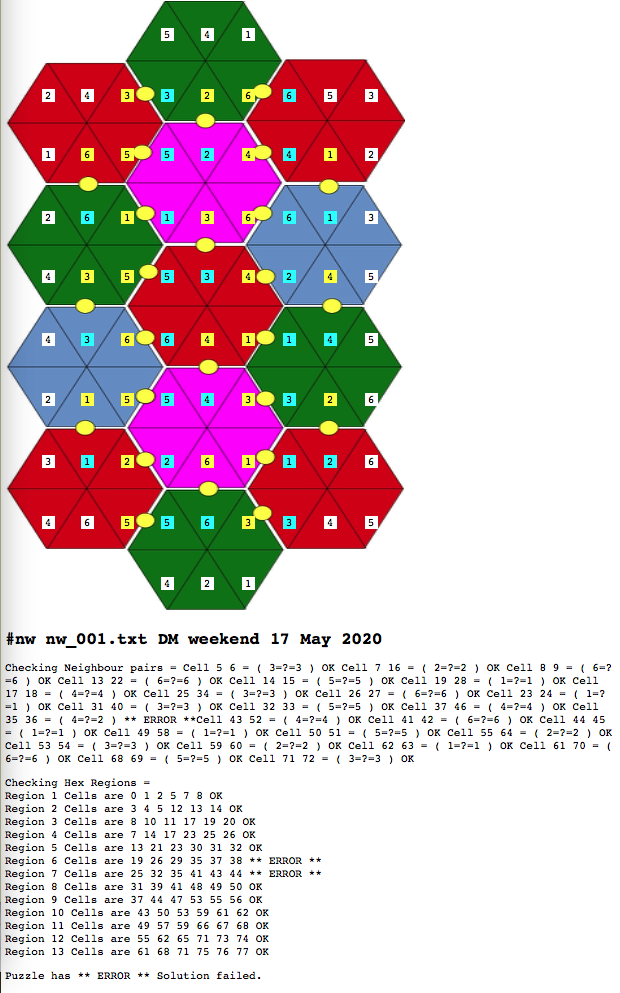
The result image is generated with the pairs of boundary cells highlighted in yellow and teal.


Fig:2 the solved puzzle, Yellow cells are "First of Pair", Teal are "Last Of Pair"
The checking lines show that the hexagon regions and number pairs are correct.

#nw nw_003.txt DMWeekend 25 May 2020

Checking Neighbour pairs = Cell 5 6 = ( 3=?=3 ) OK Cell 7 16 = ( 2=?=2 ) OK Cell 8 9 = ( 6=?=6 ) OK Cell 13 22 = ( 6=?=6 ) OK Cell 14 15 = ( 5=?=5 ) OK Cell 17 18 = ( 4=?=4 ) OK Cell 19 28 = ( 1=?=1 ) OK Cell 25 34 = ( 3=?=3 ) OK Cell 23 24 = ( 1=?=1 ) OK Cell 26 27 = ( 6=?=6 ) OK Cell 32 33 = ( 5=?=5 ) OK Cell 31 40 = ( 3=?=3 ) OK Cell 37 46 = ( 4=?=4 ) OK Cell 35 36 = ( 2=?=2 ) OK Cell 44 45 = ( 1=?=1 ) OK Cell 43 52 = ( 4=?=4 ) OK Cell 41 42 = ( 6=?=6 ) OK Cell 50 51 = ( 5=?=5 ) OK Cell 49 58 = ( 1=?=1 ) OK Cell 55 64 = ( 2=?=2 ) OK Cell 53 54 = ( 3=?=3 ) OK Cell 59 60 = ( 2=?=2 ) OK Cell 61 70 = ( 6=?=6 ) OK Cell 62 63 = ( 1=?=1 ) OK Cell 68 69 = ( 5=?=5 ) OK Cell 71 72 = ( 3=?=3 ) OK 

Checking Hex Regions =
Region 1 Cells are 0 1 2 5 7 8 OK
Region 2 Cells are 3 4 5 12 13 14 OK
Region 3 Cells are 8 10 11 17 19 20 OK
Region 4 Cells are 7 14 17 23 25 26 OK
Region 5 Cells are 13 21 23 30 31 32 OK
Region 6 Cells are 19 26 29 35 37 38 OK
Region 7 Cells are 25 32 35 41 43 44 OK
Region 8 Cells are 31 39 41 48 49 50 OK
Region 9 Cells are 37 44 47 53 55 56 OK
Region 10 Cells are 43 50 53 59 61 62 OK
Region 11 Cells are 49 57 59 66 67 68 OK
Region 12 Cells are 55 62 65 71 73 74 OK
Region 13 Cells are 61 68 71 75 76 77 OK 

Puzzle has is OK Solution successful.


Error checks test 


If another puzzle is taken and the results from the solver adjusted before display the error checks should show that cell in fifth row has a incorrect value.

 cat nw_001M5.res | sed 's/V35 2/V35 4/' | ./numberWorkout.pl -f nw_001.txt > nw_001BROKEN.html


Fig 3: Introducing an error into the solver output to show solution error checking


Usage for logic preparation script

Usage: NumberWorkout {options} < puzzle.txt  or

    NumberWorkout {options} -f puzzle.txt < SolverOutput

    -v N :Be verbose to level N ( use v=10 for detailed output )

    -f puzzle.txt :Puzzle file needed when reading Solver output use STDIN otherwise


    Programs reads STDIN looking for either puzzleFile format lines or Solver output lines

        If the input is in puzzleFile format the program will generate solver input lines.

        If the input is in Solver output lines format the program will expect a -f puzzleFile paremeter.

            Using both these input streams program will then generate display .html output.

Game Rules

13 segmented hexagons are stacked with aligned segments. 1..6 must be put in the segments of the hegagons such that where the segemnts are aligned the number in those segments must be the same. No duplicates in a single segment. Edges must match.

Stack of hexagons ..

 *

* *

 *

* *

 *


Encode NumberWorkout puzzle Input as follows, 0 for unknown and clue numbers included.

    Error Template violation is given if not 3 or 9 numbers on an input line


    $ cat nw_001.txt

    #NW_001.txt DM weekend 17 May 2020

    501

    040000050

    100000002

    200000003

    000000000

    400600005

    000003006

    300200006

    060000040

    401


OR Process results from solver in the following format

    sat

    ( (V0 9)

    (V1 7)

    (V2 5)

    (V3 3)

    ....

to generate an html layout as output.


Appendix  : Placing tags on an image using CSS formatting

Creating the output image for the puzzle turned out to be quite simple but rather fiddly. After some trial and lots of error, a simple way to overlay an image with tags was used.  The output image is assembled into a web page and then displayed in a standard browser. The resulting webpage is then printed to a file using a screenshot utility or print to .pdf function.


Fig 4 Shows the parts required to build the tags over image web display page.

The style section of the page defines how certain elements are to look.  po in yellow box sets the format for a tag. Then c0 to cxx, in red box, define the column positions followed by r0 to rxx the definitions for the row positions.

The image is displayed in the blue box. The tags are then individually placed using the class string built from the above styles. The example in green box "po c3 r3" is positioned at from left 240px and from top 305px.

For the results image the styes py and pb where added along side p0 with definitions that included a different  background:colour; definitions.


Fig4: Webpage elements for Tags over image

Using CSS tags to annotate an image is preferable to overlaying an html table because the tags can be generated in any order. The whole html result document can be generated by the script with adjusted image size and column and row placements if required. 

Acknowledgments

Thanks to w3schools for the CSS tutorial information and Design Consideration for the useful blog entry.


SMT Solvers, introduction and links (Start here with the readme)

Total Concentration from The Turing Tests - Expert Numbers puzzles, solved using SMT (Integer) solver.

Page 10 of the Expert Number Puzzle book gives us a straight forward "Total Concentration" puzzle to solve. This puzzle is also kn...