Showing posts with label SMT-2. Show all posts

Chat-GPT and other OCR performance tested on grid data.

Chat-gpt OCR fail in June 2025, Excel does better.


 The image above is a Samurai Sudoku that consists of five interlocked normal sudoku. Each of which works using the normal sudoku rules. This puzzle has been solved using SMT integer solvers but the tedious part is typing in the initial puzzle. Extracting the numbers into a matrix seems like the kind of work that would be suitable for AI. Turns out neither AI nor other "free" web OCR offerings are suitable.

Chat-GPT just can't read the grid ( or the numbers )


That was a rather disappointing fail. It seems obvious that the grid has not been correctly removed before extracting the numbers and the alignment of the numbers has not been preserved. There are also numbers missing from the top right hand corner of the puzzle. Refining the ask produces hardly any better results.

We follow up with a refinement ... 

And the results .... It seems a bit like a sulky teenager who knows what work needs to be done but can't actually put in sufficient effort to get correct and accurate results.

The best Chat-gpt managed on two passes


Other "Free OCR" services

After a quick search, a couple of "free" image to OCR services were tried out. Both of these offered to do the conversion work but would not deliver the results until a fee was paid. The fee was often tied up with some kind of subscriptions to the service. Only one service would deliver the results by email but provided this useless file where all the structure of the numbers has been lost.


Excel has the answer (almost)

After a bit of further searching for a solution the following Excel feature was found in this support note with a handy demo video. "Insert data from a picture" This would seem to be the exact answer required until the killjoy text ....
Important: Data from Picture in Excel for Windows is only supported on Windows 11 or Windows 10 version >=1903 (must have Microsoft Edge WebView2 Runtime installed).

However Excel for Office365, being a web platform, was more accommodating even when driven from a Mac. Using Data -> Data from Picture, the image was loaded and examined automatically then choices offered to correct the data. After correction, 1 seemed to be misread, the data was accepted into the sheet.

**Update as of June 2025 with Excel for Mac 16.98 the Data from picture feature is available offering the choice of reading the source picture from file or clipboard. The read from Clipboard was a fail but the read data from file gave similar results than the Office365 method. The OCR Engine may be different so results might vary. **
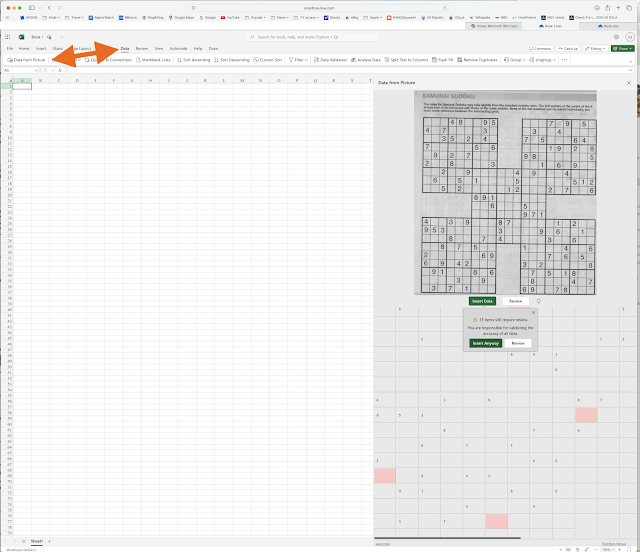


After some coloured boxed are added, a very presentable and nearly accurate enough looking sheet. Can you see what's wrong ?
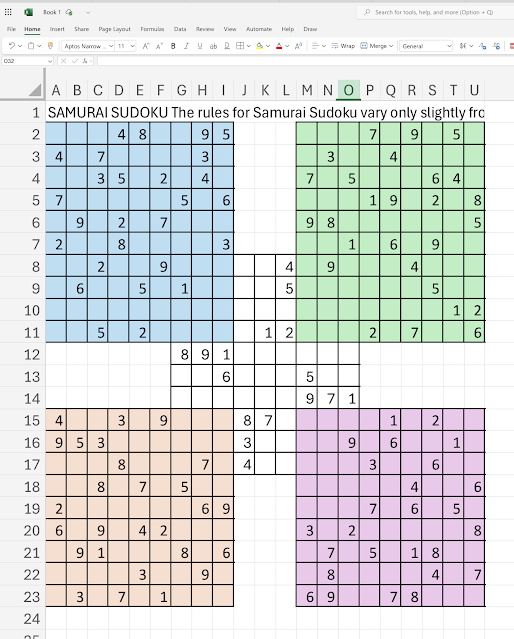

Solution

This far down the workflow, it's just a short push to the solution using an SMT integer solver. First some minor changes are required to prepare the input text before exporting as a .csv for use by the solving scripts.


Some "x" gap markers and end of data "z" markers were added to help with the later editing of the exported .csv file.


Once exported the X & Z markers are removed and ,, converted to ,0, using vi text editor commands. After the first pass at solving it becomes clear there is an image to grid transcription error. An extra line has been inserted and some of the data ( 5 then 1 & 2 ) was split between those lines. This may have been caused by the slight tilt in the original image but is not very satisfactory. 


After correcting the misalignment and using the previously described sudoku .csv to SMT integer conversion script Mathsat solver completed the task in  about 0.34 seconds on an M2 Mac.

% time ./sudoku_GiantX_smt2.pl < RG_002.csv | ../../../solver_mathsat5 | ./sudoku_GiantX_smt2.pl -f RG_002.csv > RG_002.html

./sudoku_GiantX_smt2.pl < RG_002.csv  0.01s user 0.01s system 88% cpu 0.021 total

../../../solver_mathsat5  0.34s user 0.02s system 98% cpu 0.369 total

./sudoku_GiantX_smt2.pl -f RG_002.csv > RG_002.html  0.01s user 0.00s system 4% cpu 0.370 total

giving this answer image. 


Mac native method also failed

A Mac native method was suggested but did not go well.

Using photos to find text in an image.
Only the highlighted cells are found and extracted.

Grid format, number order are lost when pasted into Numbers.

In conclusion

Chat GPT did not get anywhere near the required level of accuracy for this relatively simple looking OCR task. Other web based "text extraction from an image" services required upfront payments, even though they said they were free.

Digging deep into the reliable proven, if idiosyncratic, Microsoft Excel found an answer. Even that wasn't perfect with a line split
incorrectly in the data. Further refinement of the Excel extraction workflow will probably provide a close enough solution, removing the need to type in the Samurai Sudoku grids. To get the best capture of numbers and positions, as with any OCR process the text should stand out from the background. Using a picture editor to change the background from grey to white helped make the image more readable.

The Mac native "Find text in an image" was also disappointing but as the "data from picture" feature is now available in Excel for Mac, latest versions, this platform can be used.

Reworking the process on a similar image

From the original image after being "de grayed" ...
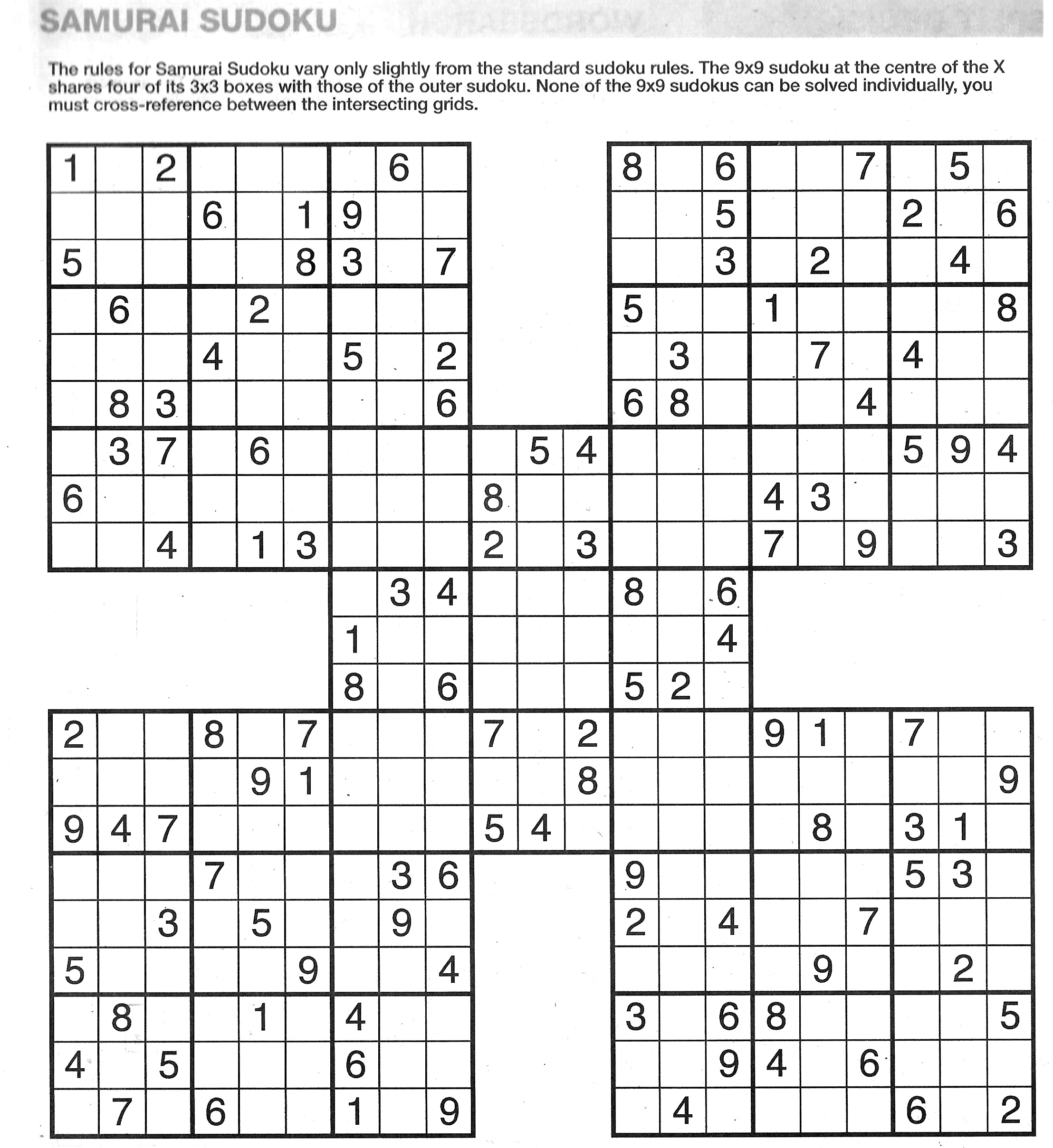
Original "degray ed" image

Recognised by Excel import from picture becomes ( after a bit of text editing ) ..


In the above text 3 numbers were out of place in the grid, found by manual inspection.
After passing through the translation and solving process becomes


And finally it only seemed fair to give Chat-GPT another go using the cleaned up picture ...


Slightly better on the shape but the contents are all woefully incorrect and over the place.

Solving Minesweeper on paper using SMT (integer) solver

Solving Minesweeper on paper using an SMT (integer) solver

Sunday 25 September 2022


An Article by Clive England, CEng, MBCS 

See Original and updates on https://gannett-hscp.blogspot.com  September 2022


Continuing the series of solving puzzles using an integer SMT solver we look now at the paper version of the Minesweeper puzzle. Originally Minesweeper was an active game shipped with various versions of Windows operating systems. This version is static as published in newspapers. See Minesweeper link for more information about the active game.


This popular logic puzzle is published in the i newspaper. The puzzle offers a rectangular grid with numeric clues from which the locations of hidden mines must be deduced. The initial clue numbers show the quantity of mines adjacent to the clue square. The numbers are generated by counting the hidden mines one step in any direction (kings move). No edge wraparound is allowed. No mines are located under clue squares.


Encoding

The puzzle is simply encoded into text then a script is used to generate the underlying logic of the puzzle. These logic lines are then passed to an SMT solver for analysis and resolution. Microsoft's Z3 and MathSAT solvers are used. The above puzzles are encoded as follows.


#iMine iMine_220917.txt

.0..00...2...1..

...3..3....2..0.

2....1....43.1..

3.......3.3.....

.3..2..3.3...3.1

..1.....2....3..

0....0..2..1.1..

....1.0.....1..1

.2.0...1..3.....

...0..0.0..3.22.

1.1.3....13.....

......2.....3..2


#iMine iMine_test03.txt

0...0

..1..

0...0


The puzzle logic for iMine_test03.txt is generated from the encoding as follows: 

    After some pre-amble to set the solvers into “linear integer” mode a value is declared for each of the empty “.” squares. 

    The range of that value then limited to 0 or 1. In the results of the solver a 1 indicates the presences of a mine in that square.  The numbering of the values is critical to the simplicity and generation of the logic to solve the problem.  

    Each cell in each row is numbered sequentially but there is a jump in numbers between the sequential rows. 


#iMine iMine_test03_Cell_numbers.txt

V0   V1  V2  V3  V4 

V9  V10  V11 V12 V13

V18 V19  V20 V21 V22  


The jump in value numbering is to avoid wrap around at the row edges.  For example the first cell on the second row is V9, to check the cell to left of V9 the logic generation script checks to see if V8 exists. As V8 is not defined the cell is treated as on the edge and V8 is not included in the logic definition. The same applies on the right hand edge of Row 1, where counting from cell V0,  V4 is not defined as it is a clue square and V5 is not defined as being off the edge of the board. The second row starts with V9.

    Words after a ; on the logic line are comments and are ignored.

    A value V000 is defined and set to value zero to assist with the case where the contents of an empty cell are defined by just one clue cell.


(set-logic LIA)

(set-option :produce-models true)

(set-option :produce-assignments true)

(declare-const V000 Int)

(assert (= 0 V000))

(declare-const V1 Int)           ; Row 1

(assert (or (= 1 V1) (= 0 V1)))

(declare-const V2 Int)

(assert (or (= 1 V2) (= 0 V2)))

(declare-const V3 Int)

(assert (or (= 1 V3) (= 0 V3)))

(declare-const V9 Int)           ; Row 2

(assert (or (= 1 V9) (= 0 V9)))

(declare-const V10 Int)

....

(declare-const V21 Int)

(assert (or (= 1 V21) (= 0 V21)))


The main logic of the puzzle is generated, one line for each of the numeric clue squares.  Each of the potential mine squares has to be 0 or 1 with the total number of 1s in the surrounding 8 squares being the same as the provided clue. Mines cannot be under clue squares. 


(assert (or (= 1 V21) (= 0 V21)))

(assert ( = 0 ( + V000 V1 V9 V10 )))       ; sqr=0 

(assert ( = 0 ( + V000 V3 V12 V13 )))       ; sqr=4 

(assert ( = 1 ( + V000 V1 V2 V3 V10 V12 V19 V20 V21 )))       ; sqr=11 

(assert ( = 0 ( + V000 V9 V10 V19 )))       ; sqr=18 

(assert ( = 0 ( + V000 V12 V13 V21 )))       ; sqr=22 


After testing it was found that some boards generate logic such as 

    (assert ( = 1 ( + V11 ))) ; sqr=10

giving an SMT error

    (error "ERROR: + takes at least 2 arguments (1 given) (line: 256)")

The was fixed by this defining V000 being value 0 and then generating the logic line

    (assert ( = 1 ( + V000 V11 ))) ; sqr=10


Finally, after triggering the satisfiability of the logic, the values of the possible mine holding squares are output. 

(check-sat)

(get-value ( V1 V2 V3 V9 V10 V12 V13 V19 V20 V21  ))

(exit)


The above logic is provided to the SMT logic solver Mathsat5 ( or Microsoft’s 3 ) and the results are obtained.


sat

( (V1 0)

  (V2 1)

  (V3 0)

  (V9 0)

  (V10 0)

  (V12 0)

  (V13 0)

  (V19 0)

  (V20 0)

  (V21 0) )


The results are read, alongside re-reading the puzzle file, to generate answer display table in html. The Red “<->” squares indicate the placement of a hidden mine. Green “.” squares are empty, clue squares show the clue value.


Result validation


Using the results from the solver each of the clue number squares are checked to see if the final solution is validated.


To check the validation one of the provided answer values is changed and .


$ ./iMine_smt.pl < iMine_220917.txt | ~/CodeProjects/solver_m5 | sed 's/(V43 0)/(V43 1)/'|  

  ./iMine_smt.pl -f iMine_220917.txt  > iMine_220917.html


Two dreamboards

In active Minesweeper a dreamboard is a very easy intermediate game that can be solved in record times. Full exploration here  Two are solved here in about   real 0m0.048s each.


Paper Versus active game

The dream boards, taken from the active game, are showing up the gap between the active game and the paper version of the game. In the active game there are situations where you just have to hold breath and guess because not all the clues are exposed at the beginning. In the paper game all the mines / no mines should be deductible from the provided clues. The solver has suggested placed mines in the open ground where there is no evidence from the clues that there are or are not mines. Because the clues in the paper game are incomplete the results are somewhat indeterminate. 

In this section half way down on the right hand side of dreamboard_001

...
...
.11
.2.
.3.
.2.
.11
...

There are two possible valid answers from the clues provided, the one given by the solver suitable for the paper game


and the one shown in the active game solution.


In the active game the has the "No mines can have naked edges" rule that does not apply in the paper version of the game. This causes the anomaly. A few carefully placed 0s would guide the solver away from the large open areas. A 0 diagonally near the 3 in the section above would resolve the dilemma in this case. 

Cartoons

Some Minesweeper cartoons here.


References

Programming Z3 Sudoku section from Section 8.1 page 139

Building a Sudoku Solver with SAT,  

A SAT-based Sudoku Solver,  

Sudoku as a SAT Problem, 

Optimized CNF Encoding for Sudoku Puzzles 

Mathsat5 solver


Usage for the Minesweeper to SMT generation utility


Usage: Minesweeper {options} < puzzle.txt  or

    Minesweeper {options} -f puzzle.txt < SolverOutput

    -v N :Be verbose to level N ( use v=1 for detailed output )

    -f puzzle.txt :puzzle file needed when reading Solver output use STDIN otherwise


    Programs reads STDIN looking for either puzzleFile format lines or Solver output lines

        If the input is in puzzleFile format the program will generate solver input lines.

        If the input is in Solver output lines format the program will expect a -f puzzleFile paremeter.

            Using both these input streams program will then generate display .html output.

Game Rules

        The layout of a minefield is described using a rectangular grid with integers and gaps.

        Each number indicates the proximity of mines on directly adjcent squares (8 directions)

        Mines cannot be on numbered squares and there is no board wraparound.


Each Minesweeper puzzle Input as follows can be any size rectangle


        #iMine iMine_220917.txt

        .0..00...2...1..

        ...3..3....2..0.

        2....1....43.1..

        3.......3.3.....

        .3..2..3.3...3.1

        ..1.....2....3..

        0....0..2..1.1..

        ....1.0.....1..1

        .2.0...1..3.....

        ...0..0.0..3.22.

        1.1.3....13.....

        ......2.....3..2


        or this minimal test


        #iMine iMine_test03.txt

        0...0

        ..1..

        0...0


to generate an SMT2 input file.


OR Process results from solver in the following format

    sat

    ( (V0 9)

    (V1 7)

    (V2 5)

    (V3 3)

    ....

to generate an html table as output. 


The Solver results are read,

        alongside re-reading the puzzle file, to generate answer

        display table in html. The Red “<->” squares indicate the

        placement of a hidden mine. Green “.” squares are empty,

        clue squares show the clue value.


The results are validated by checking each of the clue numbers

        has the correct numbers of mines in the surrounding squares.


VALIDATION FAIL or VALIDATION PASS is provided.


SMT Solvers, introduction and links (Start here with the readme)

File, file extension, file format, file type, readme icon - Download on  Iconfinder

Satisfiability modulo theories library, is the a grand title given to what we will refer to as SMT – Lib or even just SMT. This blog and its associated articles are the result of trying to find some software that would both complete every possible known Sudoku and provide a way forward for a problem solving project that was bogged down. 

SMT has quite a high barrier to entry, the descriptions of how they work and what they can do are very mathematically orientated, using symbols and characters that are unfamiliar to most computer programming folks. However, with a little perseverance, trial and error, they can be a great stepping stone toward solving a multitude of different problems. 

Starting out with solving Sudoku in mind. The initial step was understanding how to describe the rules of Sudoku in a way that can be presented to a general purpose, SMT solver. Unlike other programming approaches, the required effort is around describing the rules and conditions of the problem whilst completely ignoring how to progress those rules to reach an answer. The solver takes on all the effort of reconciling the constraints of the particular puzzle, giving a viable answer or rejecting the puzzle as unsatisfiable. 

Gone is the complexity of implementing the many solving rules for Sudoku replaced by a simple text manipulation script that reads the input puzzle, generates a SMT language file, passes it to the solver then reads the solver results. This solution pipeline can be applied to many different puzzle types ( but not crosswords) with just minor adjustments to the scripts.

The stages of the puzzle solving pipeline are are :

  • Image of Puzzle,
  • Text representation of puzzle,
  • Script to convert from text to SMT language,
  • Solver,
  • Script to convert results to a display.

A detailed writeup on Sudoku and some of its variants can be found here but the short description is as follows :

  • Tell solver what type problem this is and that answer values will be required
  • Declare 81 integers each of which can only have values between 1 and 9.
  • Declare that each row, column and sub-square must have unique values,
  • Set the known clue numbers,
  • Ask for the answers

By describing the problem in this exact way the solver will find an answer. For sudoku puzzles of different shapes and answer values, the number of variables and their range can be simply adjusted in the conversion script.

The solver used is not artificial intelligence. They are entirely deterministic and driven purely by the input statements provided to them. By defining the problem in strict logical terms, that logic can be manipulated in order to find the answers. No guesswork or training is required by the solver. Every answer is logically deducted from the provided input statements. 

Following on from the success of solving any type and shape of Sudoku, other puzzles were tackled using a similar techniques. The wrinkle being some of the problems require careful manipulation in order to create the required SMT language. The conversion of results into a displayable page image was mostly taken care of using generated HTML text displayed in a browser. 

SMT solvers have traditionally been used in the rarefied areas of theorem proofing and program integrity, checking. There use here whilst less formal provides some insight into how deconstructing a problem into its core aspects, and then concentrating just on those features can provide a useful introduction to 1st order logic and getting the job done quickly.


Solving Seki using an SMT (integer) solver

This entry describes how the Seki puzzle is deconstructed into logic lines suitable for a solver such as Z3 or MathSat. Other puzzles are available. This article is one of a series reframing logic puzzles into a format suitable for an SMT Integer solver.


Seki is a city in the Gifu province of Japan and the name of a simple logical puzzle. The puzzle has a four by four grid of black or white squares painted according to rotors positioned at the intersection of each four cell group. The task is to set the position of the independent rotors so that each cell is either set black or white.


Encoding

This fixed size puzzle can be encoded using a list of the rotor types showing at the cell intersections. 

Possible Rotors are : 
+ = singleOn, one segment is black
- = singleOff, one segment is white, three segments are black
o = opposite2, like the BMW logo 
a = adjacent2, like a 1/2 eaten pie 

For the puzzle above we have :
oo+ooaoo-

The output of the solution would be the settings of the cells numbered V0 to V15 each with a 1 (black) or 0 (white) assignment.
Cell numbers grid

Puzzle Logic

Whilst the intersection rotors are independently set they have interdependencies with neighbouring rotors. Each rotor must be positioned without conflicts over the cells shared between the rotors. We can see that the rotor types dictates the number of surrounding cells that are set to black. For o and a rotors two cells are set. One and three cells are set for the + and - rotor types. By having 16 cells each set to 1 or 0 we can use the rotors as constraints for the setting of the group of cell values that surround each rotor. The similarity of the o and a rotors require some extra logic to constrain which two of the surrounding cells are set.

Each rotor +, - and "a" rotors have 4 possible positions but the "o" rotor only 2. Depending on the number of o rotors in a given puzzle the maximum number of possible rotor arrangements is  4^9 = 262,144. This particular puzzle has 4^3 + 6^2 = 100 possible arrangements.


Building the SMT-Lib file

With the puzzle rotors encoded, the next stage is to convert the puzzle rotor types into logic lines for a solver. The bridge between problem and solver ready input is the SMT-Lib language. The SMT logic lines start with a preamble describing the type of logic being used then each of the unknowns are declared, limited to a range and then linked to the other numbers using a constraint relationships.  63 lines of logic are generated in total for this puzzle.

In the pre-amble we set the solver into integer mode and declare that answer and values will be need beyond just proof that the puzzle can be solved.

(set-logic LIA) 
(set-option :produce-models true) 
(set-option :produce-assignments true)


Each of the target cells are declared and set to the required value range of 0 or 1. In theory we could use a boolean value for each cell but as the constrains are phrased in terms of the number of cells set in a rotor group using integers limited to value 1 or  0 allows for easier addition.

(declare-const V0 Int) 
(assert (or (= V0 0) (= V0 1) )) 
(declare-const V1 Int) 
(assert (or (= V1 0) (= V1 1) )) 
(declare-const V2 Int) 
(assert (or (= V2 0) (= V2 1) ))
.....  

and on up to V15. The constraints between the cells belonging to each rota are set according to the rotor type. For the + and - rotor types there is a single constraint being the total number of the surrounding cell values. The o and a also have the number of cells set as a constraint but also a further constraint line enforcing the rotor pattern type is generated.  o rotors must have one of two pairs of opposite cells set to 1.  a rotors must have one of four pairs of cells set. The combination of constraining the sum of the neighbouring cells and which pairs of cells are set fully described the a rotor constraint.
 
Comment starting with ; are included to annotate the rotorgroup number, rotor type, and cells belonging to that rotor.  


;RotorGroup 0 o 0,1,4,5 
(assert (= 2 (+ V0 V1 V4 V5))) 
(assert (or (= 2 (+ V0 V5)) (= 2 (+ V1 V4)) )); o 
.....
;RotorGroup 2 + 2,3,6,7
(assert (= 1 (+ V2 V3 V6 V7)))
.....
;RotorGroup 5 a 6,7,10,11 
(assert (= 2 (+ V6 V7 V10 V11))) 
(assert (or (= 2 (+ V6 V7)) (= 2 (+ V7 V11)) (= 2 (+ V11 V10)) (= 2 (+ V6 V10)))); a 
.....
;RotorGroup 8 - 10,11,14,15 
(assert (= 3 (+ V10 V11 V14 V15)))


and finally the post-amble to generate the results


(check-sat)

(get-value ( V0 V1 V2 V3 V4 V5 V6 V7 V8 V9 V10 V11 V12 V13 V14 V15))

(exit)


Running the solver and displaying the output

The input text puzzle is generated into logic lines using a script. The script output is passed to the solver that will in turn generate "sat" and the values of the cells or if the problem cannot be solved "unsat" is returned. The output of the solver is read (piped) into the same script and an .html file of results and checked lines are presented.  
This is a very small scale problem for the solver that takes about 0.01 seconds to solve on a Mac Book Pro 2011.
The command line used is :

$ ./seki_smt.pl < sk_6018.txt | time ../solver_m5  | ./seki_smt.pl -f sk_6018.txt > sk_6018.html 


     0.02 real         0.00 user         0.00 sys


The html file results are seen as follows:

#seki MOS 01Feb2021 sk_6018.txt

1010
0100
1011
0101
Check Results

RotorGroup 0 ch=o Value=2 [0,1,4,5] gives Sum = 2 finalRes=0
RotorGroup 1 ch=o Value=2 [1,2,5,6] gives Sum = 2 finalRes=0
RotorGroup 2 ch=+ Value=1 [2,3,6,7] gives Sum = 1 finalRes=0
RotorGroup 3 ch=o Value=2 [4,5,8,9] gives Sum = 2 finalRes=0
RotorGroup 4 ch=o Value=2 [5,6,9,10] gives Sum = 2 finalRes=0
RotorGroup 5 ch=a Value=2 [6,7,10,11] gives Sum = 2 finalRes=0
RotorGroup 6 ch=o Value=2 [8,9,12,13] gives Sum = 2 finalRes=0
RotorGroup 7 ch=o Value=2 [9,10,13,14] gives Sum = 2 finalRes=0
RotorGroup 8 ch=- Value=3 [10,11,14,15] gives Sum = 3 finalRes=0

Puzzle OK Solution successful.

 This problem could be easily scaled up to a much larger size. The usual fail confirmation test is successfully run generating this message if the cell values do not match the rotor type values. 

Puzzle has ** ERROR ** Solution failed by difference = 2.


Appendix usage for logic preparation script


Usage: Seki {options} < puzzle.txt  or

    Seki {options} -f puzzle.txt < SolverOutput

    -v N :Be verbose to level N ( use v=10 for detailed output )

    -f puzzle.txt :Puzzle file needed when reading Solver output use STDIN otherwise


    Programs reads STDIN looking for either puzzleFile format lines or Solver output lines

        If the input is in puzzleFile format the program will generate solver input lines.

        If the input is in Solver output lines format the program will expect a -f puzzle File paremeter.

            Using both these input streams program will then generate display .html output.

Game Rules

Given a 4*4 grid with a coloured rotor on each line intersection, colour the grid based on the segments in the rotors ( which can be rotated )


Encode seki - Look at the 9 rotors and encode for type

    Possible Rotors are :

    +  = singleOn only one segment is dark

    -  = singleOff only one segment is light

    o = opposite2 Like the BMW logo

    a = adjacent2 Like a 1/2 eaten pie


    $ cat sk_6018.txt

    oo+ooaoo-


OR Process results from solver in the following format

    sat

    ( (V0 9)

    (V1 7)

    (V2 5)

    (V3 3)

    ....

to generate an html layout as output.


SMT Solvers, introduction and links (Start here with the readme)

Total Concentration from The Turing Tests - Expert Numbers puzzles, solved using SMT (Integer) solver.

Page 10 of the Expert Number Puzzle book gives us a straight forward "Total Concentration" puzzle to solve. This puzzle is also kn...